iOS 27's Quietest New Feature Might Be Its Most Important One
When Apple released iOS 27 on September 14, most of the attention went to the iPhone 18 lineup and the usual round of Siri and camera tweaks. Buried inside Settings, though, is a feature that doesn't get a keynote slide but addresses a problem security teams have been unable to solve for years: what happens when a scammer doesn't hack your phone, but convinces you to hand over access yourself.
It's called Impersonation Risk Detection, and it's designed specifically for the scam category that two-factor authentication was never built to catch.
The Problem It's Trying to Fix
Most phone security assumes the attacker is trying to break in from outside — guessing a password, intercepting a code, spoofing a login. Two-factor authentication handles that scenario reasonably well.
But a huge share of financial fraud today doesn't work that way. An attacker calls posing as your bank's fraud department, a government agency, or even someone from Apple itself. They build urgency, sound convincing, and walk you through the exact steps to move money or turn off your own security settings — with you tapping every button yourself. Since you're the one authorizing the action, 2FA doesn't flag anything as wrong, because technically nothing is wrong from the system's point of view. You were tricked, not hacked.
That's the gap Impersonation Risk Detection is aimed at closing.
How It Actually Works
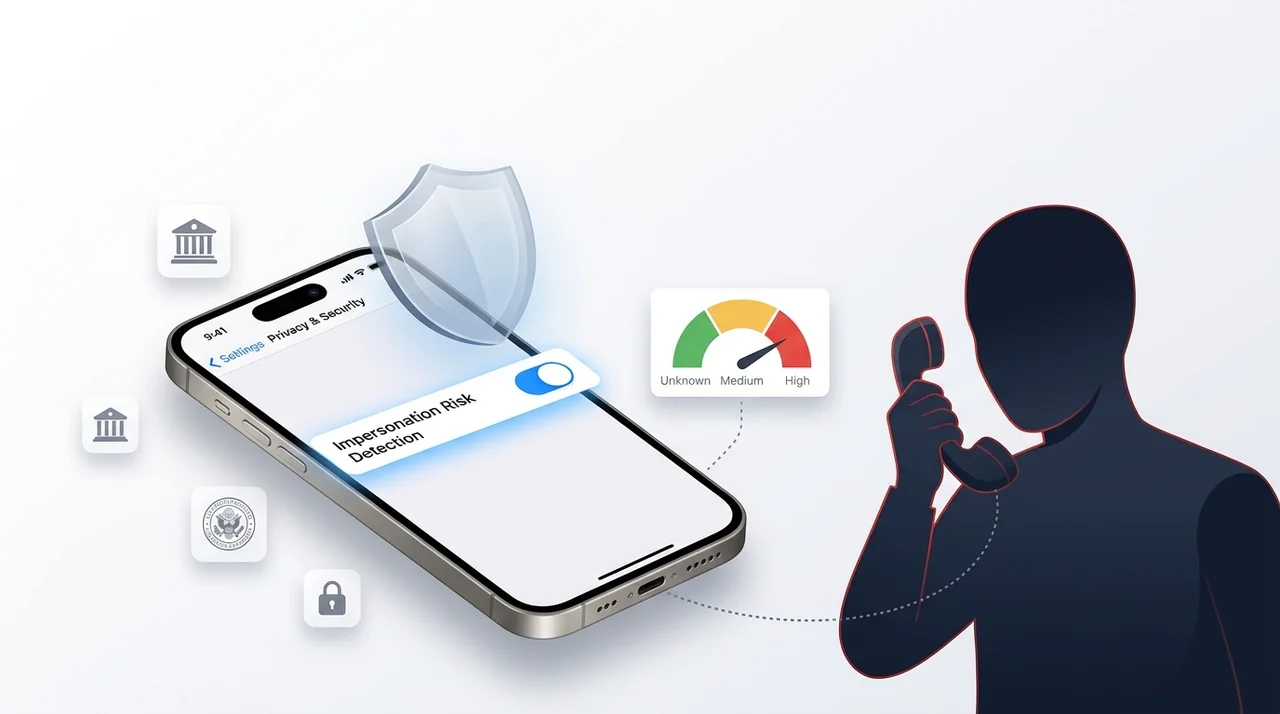
According to Apple's own support documentation, the feature analyzes signals already present on your device and tied to your Apple Account — things like general usage patterns, app download and purchase history, and basic interaction timing — entirely on-device. It doesn't send this raw data anywhere. Instead, it distills everything into a single risk rating and hands that to a supporting app when the app requests it, typically right before a sensitive action like a payment or a password change.
There are three possible ratings:
- Unknown – no signs of suspicious activity were found (this doesn't guarantee the action is safe, just that nothing stood out)
- Medium – some indicators of a possible scam were detected
- High – strong signs that something is actively wrong
What the app does with that rating is up to the app's developer — it might insert a short delay, show a warning, or ask you to re-verify your identity before continuing.
The Catch: It's Off by Default, and Apps Have to Opt In
Here's the part most people will miss: Impersonation Risk Detection doesn't do anything on its own. It ships switched off, and it only works inside apps whose developers have specifically built support for it. Apple hasn't published a list of which apps currently qualify, so for most users right now, turning the setting on is more of a "when it's ready" move than an immediate safeguard.
That's a fair trade-off from a privacy standpoint — the system isn't quietly profiling every app you use — but it does mean the feature's real-world impact will depend entirely on how quickly banking and payment apps adopt it.
How to Turn It On
- Open Settings
- Tap Privacy & Security
- Scroll down and tap Impersonation Risk Detection
- Turn on Share with App Developers
- You may be prompted to sign in to the App Store with your Apple Account to complete setup
One detail worth remembering: changes to this setting can take up to 24 hours to actually apply. That's intentional — it means a scammer pressuring you mid-call to "just turn this off real quick" can't get an instant result, which is itself a useful red flag. If someone urges you to disable this setting on the spot, treat that as a warning sign, not a technical inconvenience.
You can also check Recent Activity in the same settings menu to see which apps have requested a risk assessment and why — a small but genuinely useful transparency layer that a lot of "AI safety" features on other platforms don't bother to offer.
Why This Matters More Than It Looks
Social engineering scams have gotten more convincing, not less, as scammers lean on AI-generated voices and more polished scripts. A feature that quietly checks context — rather than asking users to somehow "just be more careful" — is a more realistic response to how these scams actually succeed. It won't stop every scam, and it's limited by how many apps bother to support it. But as a background layer that costs the user nothing to enable, there's little reason not to turn it on now, even before your banking app catches up.
FAQ
Does Impersonation Risk Detection work on all apps?
No. It only functions inside apps that have specifically added support for it, and Apple hasn't released a public list yet.
Is it turned on by default?
No — you have to manually enable it through Settings > Privacy & Security > Impersonation Risk Detection.
Does Apple see my personal data through this feature?
No. The analysis happens on-device, and only a risk level (not the underlying data) is shared with the requesting app.
Which devices support it?
It's available starting with iOS 27 and iPadOS 27, including the iPhone 18 lineup.