Samsung Gallery has long been a hidden gem among Android users, often overshadowed by the more popular Google Photos. However, this underappreciated app offers a range of features that can significantly enhance the photo management experience for Galaxy users. With its user-friendly interface and powerful functionality, Samsung Gallery presents a compelling alternative for those looking to optimize their photo storage and sharing capabilities.
Intuitive User Interface
One of the standout features of Samsung Gallery is its intuitive user interface. Unlike Google Photos, which can sometimes feel cluttered with options, Samsung Gallery maintains a clean and straightforward design. This simplicity is not just aesthetic; it enhances usability, allowing users to navigate their photo collections effortlessly. Users can quickly find their images without getting lost in a maze of menus, making photo management a breeze.
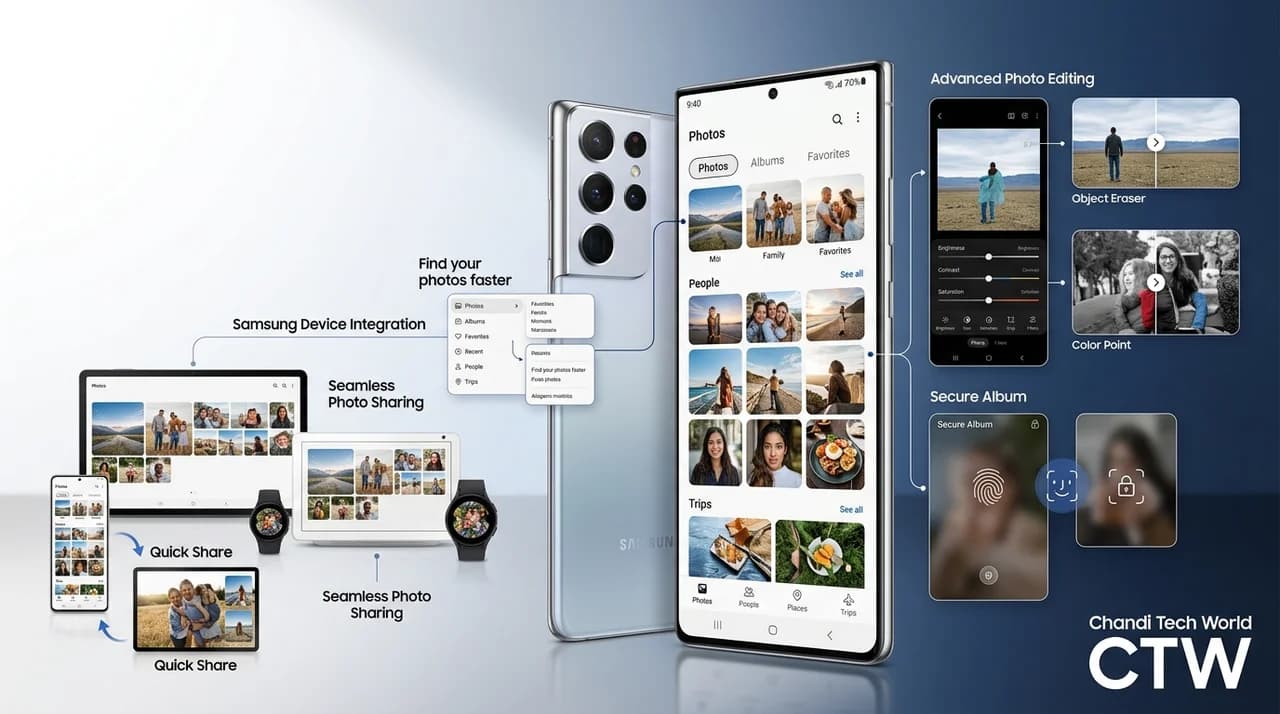
The layout of Samsung Gallery is designed with the user in mind, featuring easy access to albums, recent photos, and favorites. This organization allows users to interact with their images in a more enjoyable manner, encouraging exploration and engagement with their memories.
Advanced Editing Tools
Another significant advantage of Samsung Gallery is its robust editing tools. While Google Photos offers basic editing capabilities, Samsung Gallery allows users to go a step further with a variety of advanced features. Users can adjust brightness, contrast, and saturation, apply filters, and even crop images with precision. These tools empower users to enhance their photos directly within the app, eliminating the need for third-party editing software.
Moreover, Samsung Gallery includes features such as object eraser and color point, which enable users to refine their images creatively. These advanced editing options allow users to personalize their photos and achieve professional-looking results without requiring extensive knowledge of photo editing techniques.
Seamless Integration with Samsung Devices
Samsung Gallery is designed to work seamlessly across Samsung devices, creating a cohesive ecosystem for users. This integration extends beyond just photo storage; it includes features like syncing across devices and sharing options that leverage Samsung’s technology. For instance, users can easily share photos with other Samsung devices via Quick Share, ensuring a smooth and efficient sharing experience.
This seamless integration enhances the overall user experience, as it allows for continuity across devices. Whether users are viewing their photos on a smartphone, tablet, or smart TV, the transition is effortless, making it easier to enjoy and showcase their memories.
Enhanced Privacy Features
In an age where privacy is paramount, Samsung Gallery offers features that prioritize user security. The app allows users to create secure albums that can be locked with a password or biometric authentication. This functionality provides peace of mind for users who want to keep certain photos private, a feature that is less emphasized in Google Photos. By offering enhanced privacy options, Samsung Gallery caters to users who are cautious about their digital footprint.
Additionally, Samsung Gallery’s ability to hide sensitive images from the main gallery further underscores its commitment to user privacy. This feature is particularly beneficial for those who wish to maintain discretion over personal photos, ensuring that sensitive content is safeguarded from prying eyes.
Smart Organization
Samsung Gallery excels in smart organization features that help users manage their photo collections effectively. The app automatically categorizes photos based on various criteria, including location and people, making it easier to locate specific images. This intelligent sorting reduces the time spent searching for photos, allowing users to focus more on enjoying their memories rather than managing them.
Furthermore, the app's ability to create albums automatically based on events or trips enhances the user experience by simplifying the process of organizing memories. Users can quickly relive their experiences without the hassle of manual sorting, making it a convenient tool for anyone who values their photo collection.
Conclusion: A Compelling Choice for Galaxy Users
While Google Photos remains a popular choice for photo management, Samsung Gallery stands out as a superior alternative for Galaxy users. Its intuitive interface, advanced editing tools, seamless integration, enhanced privacy features, and smart organization capabilities make it a powerful option for anyone looking to optimize their photo management experience. As Samsung continues to develop and enhance this app, it’s clear that Samsung Gallery deserves more attention from users seeking a reliable and feature-rich photo management solution.
In conclusion, Samsung Gallery not only meets the needs of modern photo management but also exceeds expectations with its thoughtful design and user-centric features. For Galaxy users, embracing Samsung Gallery could lead to a more enjoyable and efficient way to cherish and share their photographic memories.
Key Highlights
- Samsung Gallery offers an intuitive user interface that enhances usability.
- The app includes advanced editing tools for more comprehensive photo enhancements.
- It integrates seamlessly across Samsung devices for a cohesive experience.
- Samsung Gallery prioritizes user privacy with secure album features.
- Smart organization helps users easily locate and manage their photos.
- The app is a compelling alternative to Google Photos for Galaxy users.
- Samsung Gallery's features cater to both casual users and photography enthusiasts.
Expert Analysis
Technical Analysis
Samsung Gallery is an advanced photo management application designed specifically for Samsung devices, leveraging the Android operating system. It offers a user-friendly interface that simplifies navigation and enhances usability, allowing users to manage their photo collections without the clutter often found in competing apps like Google Photos. The app's design focuses on accessibility, featuring easy access to albums, recent photos, and favorites, which encourages users to engage with their memories more interactively.
In addition to its intuitive interface, Samsung Gallery includes robust editing tools that surpass the basic capabilities offered by Google Photos. Users can adjust various image parameters and apply creative edits directly within the app, eliminating the need for third-party software. Features such as object eraser and color point enhance the editing experience, enabling users to achieve professional results without requiring advanced skills. The app also prioritizes user privacy with secure albums and the ability to hide sensitive images, addressing growing concerns about digital security among users.
Advantages
- Intuitive user interface that simplifies photo management.
- Advanced editing tools that allow for detailed image adjustments.
- Seamless integration with other Samsung devices for easy sharing and syncing.
- Enhanced privacy features, including secure albums and image hiding.
- Smart organization capabilities that automatically categorize photos.
Disadvantages
- No major disadvantages reported yet.
Real-World Use Cases
- Individuals can use Samsung Gallery to manage and edit their personal photo collections efficiently.
- Families can share and organize photos from events or trips using the app's smart organization features.
- Photographers can leverage advanced editing tools to enhance their images without needing additional software.
- Users concerned about privacy can utilize secure albums to protect sensitive photos.
- Samsung device users can enjoy a cohesive ecosystem by seamlessly sharing photos across their devices.
Business Impact
The rise of Samsung Gallery as a viable alternative to Google Photos could shift market dynamics in the photo management software sector. As Samsung continues to innovate and enhance its app, it may attract more users away from competitors, potentially impacting Google Photos' user base. This shift could also lead to increased revenue opportunities for Samsung through enhanced app features and services, as well as greater brand loyalty among Galaxy users.
User Impact
Samsung Gallery offers significant benefits for Galaxy users, particularly those who value ease of use, advanced editing capabilities, and privacy. Ordinary users who may have previously overlooked Samsung Gallery in favor of Google Photos should consider adopting it for a more streamlined and feature-rich photo management experience. However, users who do not own Samsung devices may not benefit from the app's unique integration features.
Security & Privacy
Samsung Gallery includes enhanced privacy features such as secure albums that can be locked with passwords or biometric authentication, addressing user concerns about digital security. This focus on privacy is particularly relevant in today's environment, where users are increasingly cautious about their digital footprints.
How It Compares
- Samsung Gallery offers a more intuitive and less cluttered interface compared to Google Photos.
- The app provides advanced editing tools that exceed the basic capabilities found in Google Photos.
- Samsung Gallery emphasizes user privacy more than Google Photos, with features like secure albums.
Future Outlook
In the near term, Samsung Gallery is likely to continue evolving with additional features that enhance user experience and photo management capabilities. As Samsung invests in further development, users can expect improvements in integration with other Samsung services and devices. The app may also expand its editing tools and organization features, making it an even more compelling choice for photo enthusiasts.
Expert Summary
The emergence of Samsung Gallery as a strong competitor to Google Photos highlights the importance of user-centric design and advanced features in photo management applications. Both casual users and photography enthusiasts should pay attention to Samsung Gallery's developments, as it offers a robust alternative that prioritizes usability, privacy, and advanced editing capabilities. Overall, Samsung Gallery represents a significant step forward in mobile photo management, making it a worthy consideration for Galaxy users.
Originally reported by Android Authority.